By Mark Boucher
Objective: We would like the operator to be queried if they need to watch a video of the part setup.

Prerequisite:
You will need a video of the part setup.
Method
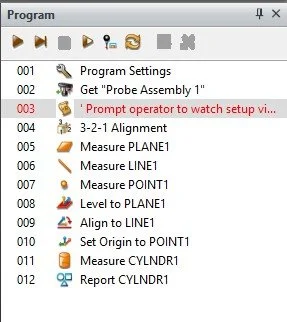
Open up CMM Manager and start a new program.
Open the VB Script window under the Program Tab and insert the VB Script below.
VB Script
' Prompt operator to watch setup video and open it if confirmed
Dim response, title, message
Dim videoPath, fso, shell
' Set the full path to your setup video file
videoPath = "C:\Videos\Alignment.mp4" 'Place the correct video path
' Set up dialog box content
title = "Part Set Up"
message = "Do you want to watch the setup video before continuing?"
' Display Yes/No prompt to the operator
response = MsgBox(message, 36, title) ' 36 = vbYesNo + vbQuestion
' If user chooses Yes, attempt to play video
If response = 6 Then ' 6 = vbYes
Set fso = CreateObject("Scripting.FileSystemObject")
If fso.FileExists(videoPath) Then
Set shell = CreateObject("WScript.Shell")
shell.Run Chr(34) & videoPath & Chr(34), 1, False
Else
MsgBox "Setup video not found at:" & vbCrLf & videoPath, 48, "Video Missing"
End If
End If
Method Continued
Add an alignment routine, in our case we used both a manual alignment and a DCC alignment. Now you can finish the program as required.

Paperback version is available on Amazon
This reference manual was developed to explain the VB Script dialog box. While VB scripting can be a extremely large topic to cover, this book does not intend to tackle that, we have targeted the CMM and many situations that you might run into while programming. The contents are one solution to each task.
The beginning of the book covers the VB scripting process and the syntax that will achieve the goals. Later on, are the examples of situations that you might come across as a CMM programmer.
Revision 2 adds more examples and detailed descriptions of the process of writing in VB Script.
This book is a digital download