What those modes actually change
On VAST XXT (the passive scanning head used with RDS), these modes set the target deflection the sensor tries to maintain while scanning/qualifying:
Sensitive ≈ 100 µm deflection
Standard ≈ 150 µm (default)
Robust ≈ 200 µm

Higher target deflection helps the XXT stay “in contact” on rough/high-form features but increases bending in long/slender styli; lower deflection is gentler but can lose contact on bumpy geometry.
Separately, Probing Dynamics (%) is essentially a speed/intensity factor used during approach/scan (not a hardness setting). Lowering it makes contact gentler and more stable for delicate styli; raising it speeds things up when the setup is stiff.
For active VAST heads (VAST XT/gold/XTR), measuring force is actively controlled (50–1000 mN typical) and “dynamics” is more about scan strategy/speed—not a deflection preset like XXT. Very long or heavy styli belong on these active heads.
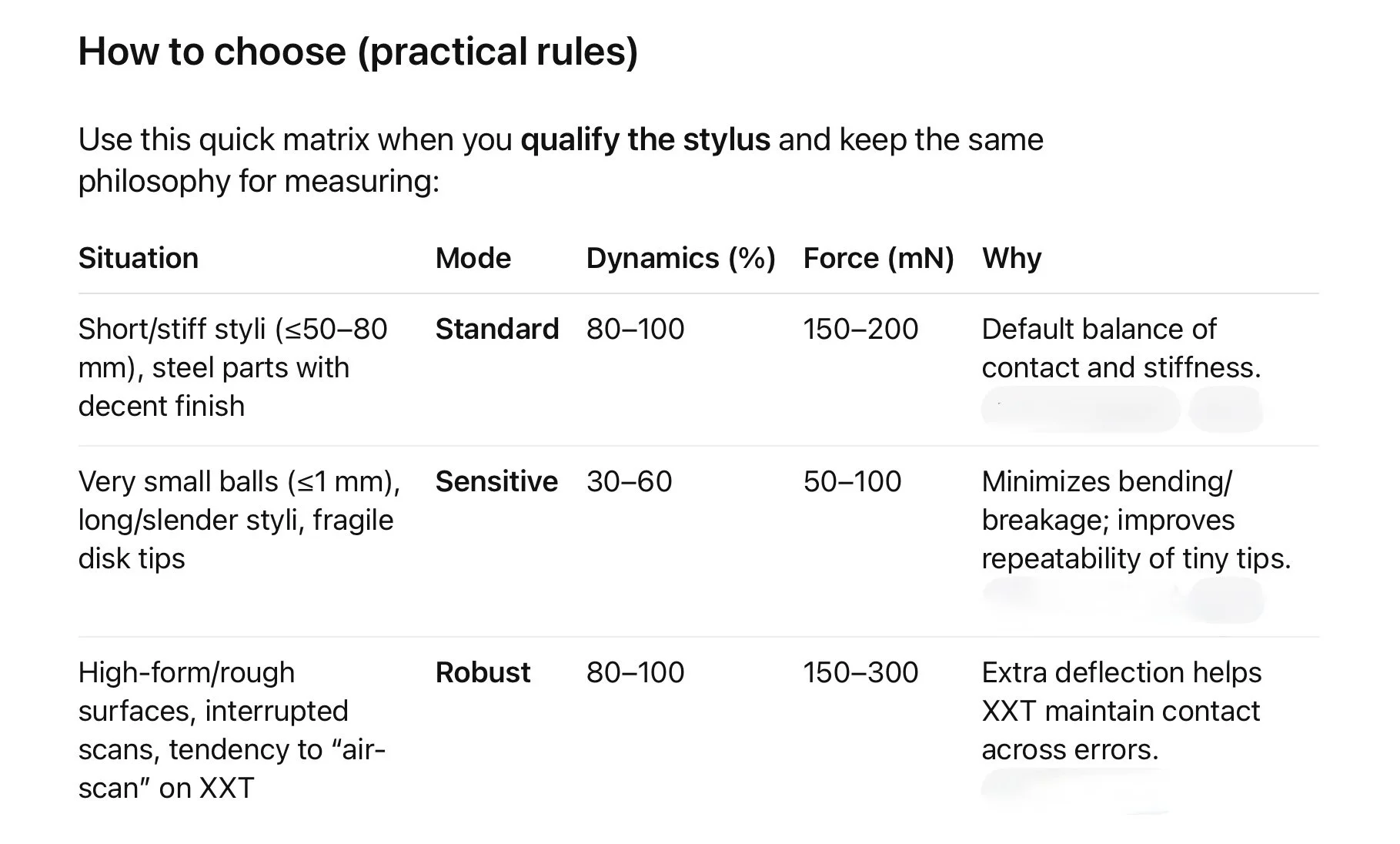
Notes:
The Sensor Cookbook from ZEISS lists example starting points (e.g., 200 mN & 100% as “standard”; drop to ~100 mN & 50% for soft/unstable parts or long shafts). Treat these as starting values and tune.
Disk styli generally qualify with Manual/Six-point methods—avoid scanning during qualification for fragile setups.
Is “contact dynamics” about material elasticity?
Only indirectly. In Calypso, dynamics/deflection are probe-system behaviors. Material elasticity/hardness matters via indentation and adhesion, so you manage that primarily with force, tip material, and speed:
For aluminum, avoid heavy scanning with ruby: adhesive transfer (“aluminum build-up”) can occur. Prefer silicon nitride or diamond-coated tips for repeated scanning.
For cast iron/abrasive surfaces, zirconia wears better than ruby.
So: softer/more deformable materials → reduce force and dynamics, and consider a different ball material; but don’t expect “Sensitive/Standard/Robust” to automatically “match hardness.” Those modes are about how much the XXT deflects and how aggressively it moves.
Long styli (mm-to-1000 mm styli, steel mostly, some aluminum, ruby + disks)
Steel, normal finish: Qualify and measure most styli Standard, ~100–200 mN, 80–100% dynamics.
Long or very thin styli / tiny balls / disk styli: Qualify Sensitive, drop to 50–100 mN and 30–60% dynamics; use six-point/manual qualification for disks.
Rough/high-form features (or if you get XXT “air scanning” warnings): Re-qualify that stylus Robust and/or enable scanning optimization; keep forces moderate.
Aluminum jobs scanned repeatedly: Swap ruby for Si₃N₄ (or diamond-coated if you have it), and use lower forces.
Very long styli (~1000 mm): That’s in active VAST territory (XXT limit values are much lower); check your machine’s VAST specs (e.g., VAST gold up to ~800 mm). Keep forces modest and dynamics conservative.
Troubleshooting signals
“The sensor did not carry out the measurement with the expected measuring force” / frequent “air-scan” popups (XXT): Increase to Robust or slow Dynamics, reduce scan speed, and confirm retract distance/approach aren’t too tight.
Squeaking on sphere during qualification: Lower dynamics/force; clean the sphere/stylus; use Sensitive; consider smaller reference sphere for sub-mm tips.
Probing Behavior and Probing Dynamics
Probing Behavior (Sensitive / Standard / Robust)
Probing Dynamics (the numeric % slider, sometimes also called “scanning dynamics”)
They interact — but they control different parts of how the sensor behaves.
1. Probing Behavior = Mechanical Stiffness Target (XXT) or Force Strategy (VAST)
When you select Sensitive / Standard / Robust, you are telling the sensor what nominal contact deflection or force to use when probing or scanning.
On VAST XXT (passive scanning):
It adjusts the target deflection the system builds up before the scale reads the measurement point.Sensitive → small deflection (less preload)
Standard → default mid deflection
Robust → large deflection (more preload → better contact over rough features)
On VAST XT / gold / XTR (active scanning):
It maps roughly to probe force ranges and recovery stiffness.Sensitive → lower measuring force
Standard → normal force
Robust → higher force (less chance to lose contact, but more stress on stylus/part)
Think of this as setting the “spring preload” for contact.
2. Probing Dynamics = Motion Energy / Speed / Damping Control
The Dynamics (%) setting is about how aggressively the probe moves in and out of contact.
High Dynamics (%):
Faster approach/retraction and scanning speed.
Less dwell time → faster cycles.
More energy → can excite flexible styli, risk vibration or bounce.
Low Dynamics (%):
Slower, gentler movement.
More stable readings with long or slender styli.
Less chance to bend the stylus or disturb a soft/deformable surface.
It’s basically a speed/damping gain, not a force change — but because the probe is mechanical, faster motion can temporarily increase the instantaneous forces.
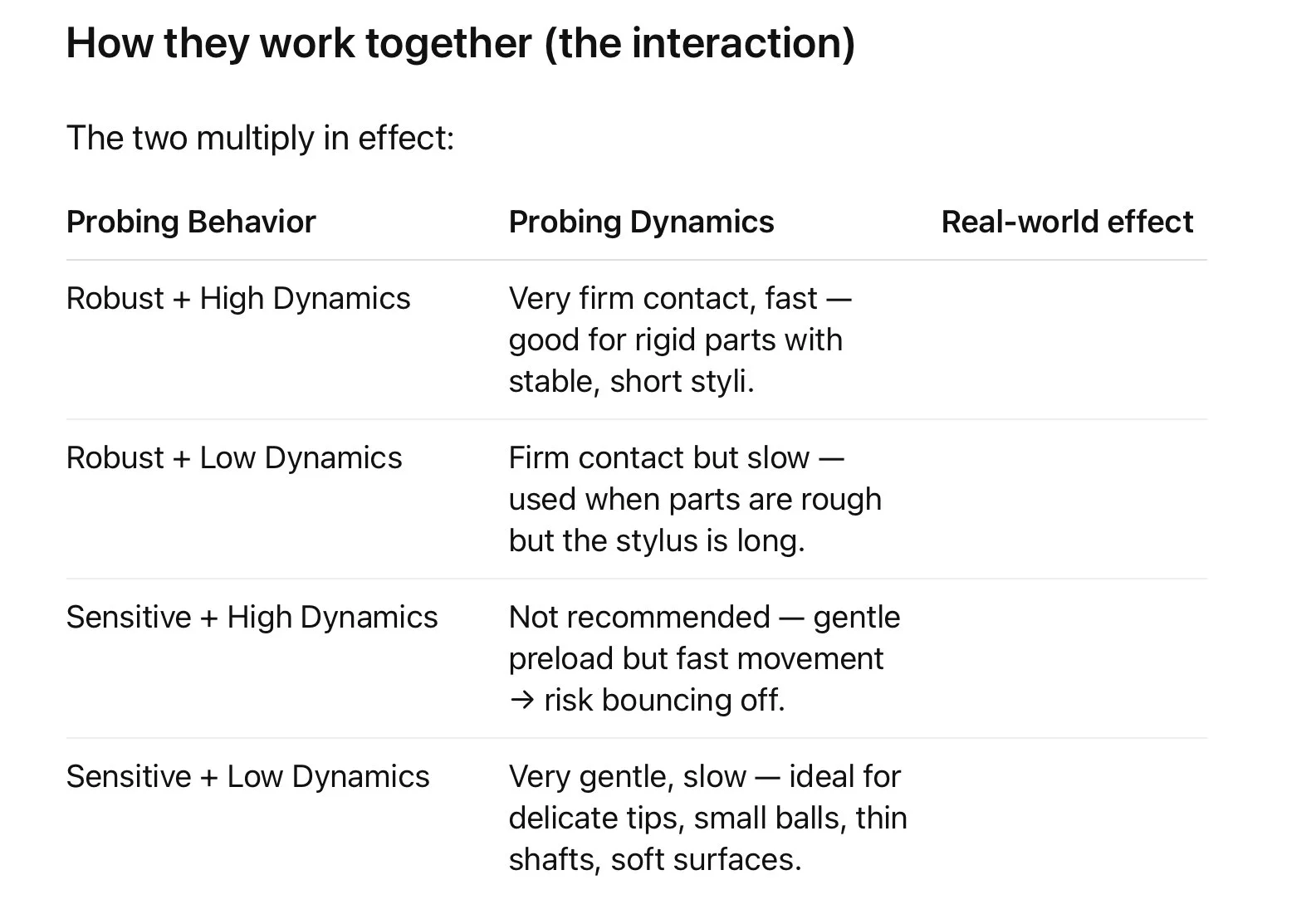
Key takeaway:
Pick Probing Behavior for how much contact force/deflection is mechanically safe & stable.
Tune Probing Dynamics for how fast and stable the probe motion is relative to that setup.
They’re complementary — not redundant.