How machine-learning segmentation works in Dragonfly 3D World ZEISS edition
An X-ray microscopy scan can show the interior of a sample, but its grayscale slices do not arrive with pores, particles, or other features neatly labeled. Before an engineer or researcher can measure those features, someone—or something—must identify which parts of the image belong to each one. In Dragonfly 3D World ZEISS edition, machine-learning segmentation helps automate that task: an analyst labels examples, trains a model, and applies it to the larger dataset. [1][2]
From pixels to labeled features
Segmentation divides an image into meaningful regions. A basic method might assign every pixel above a chosen brightness threshold to one material and every pixel below it to another. That can work when the materials have clearly different intensities. It becomes less reliable when noise, blurred boundaries, or overlapping grayscale values make different structures look alike. Dragonfly therefore offers methods ranging from manual painting and thresholding to classical machine learning and deep learning. [2]
The process begins with training labels. An analyst marks representative areas—for example, solid material, pores, and inclusions—so the software has examples of each class. The Segmentation Wizard uses those examples to train a model that predicts labels in areas the analyst has not marked. Rather than painting every slice by hand, the analyst can concentrate on supplying useful examples and checking the predictions. [2][3]

A Dragonfly interface view illustrates the workspace in which image regions and segmentation results can be inspected. Image: ZEISS. [1]
Two ways to learn from examples
Dragonfly distinguishes between classical machine-learning segmentation and deep-learning segmentation. Both use labeled examples, but they train different kinds of models. The software’s Segmentation Wizard provides a guided workflow for these approaches on multidimensional images. [2][3]
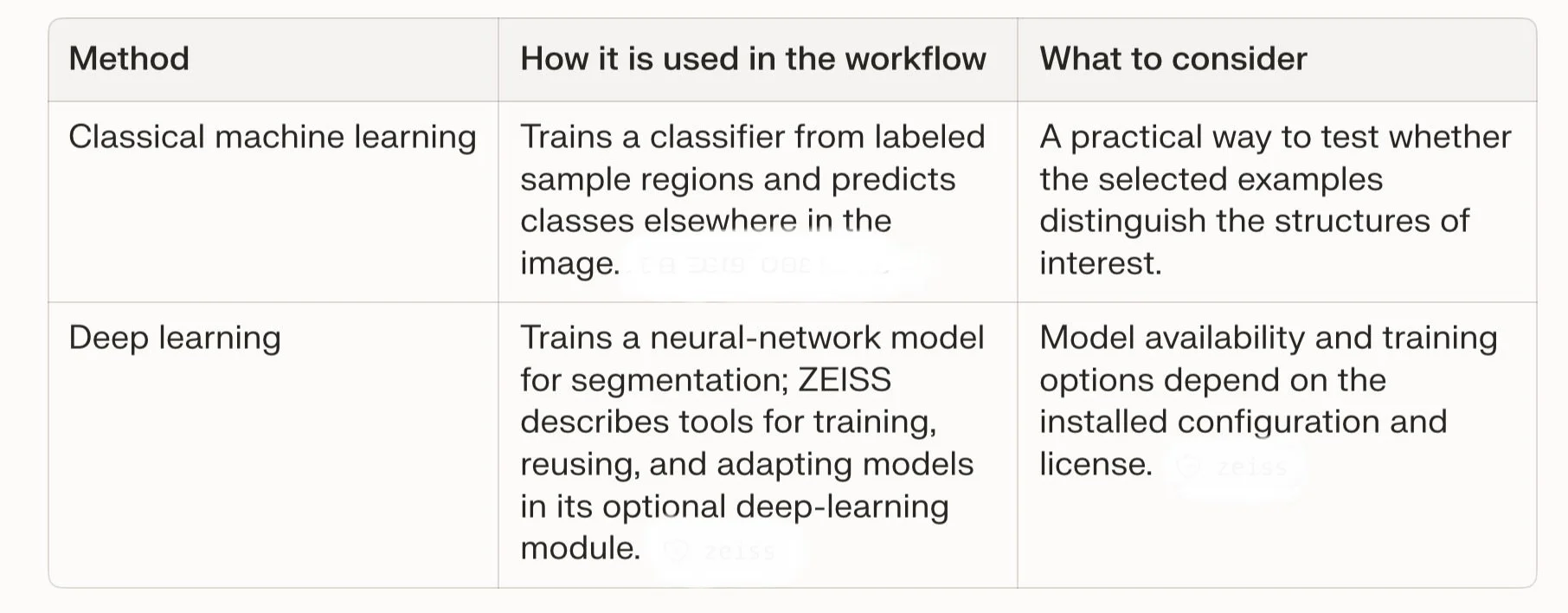
One useful sequence is to start with a small set of manual labels, train an initial classifier, and inspect its output. Corrected predictions can then provide additional training examples. A review of Dragonfly describes using a machine-learning prediction to help assemble training data for a deep-learning model. This can reduce repetitive labeling, but it does not remove the need for expert review. [4]
A practical segmentation cycle
Consider a 3D scan of a porous manufactured component. The analyst wants to determine how much of the scanned volume is void and whether the voids connect. A defensible workflow would proceed as follows:
1. Prepare the scan. Inspect the image quality and, where appropriate, crop the volume or apply processing that reduces noise without erasing small features. [2]
2. Label representative examples. Mark pores and solid material in several areas, including difficult boundaries—not only the clearest slice. [2][5]
3. Train and preview. Use the Segmentation Wizard to train a model, then test its predictions on regions beyond the original labels. [2][3]
4. Correct and retrain. Add examples where the model confuses a pore with a dark particle, or where it joins separate structures. Repeat until the result is fit for the intended analysis. [4][2]
5. Measure the result. Apply the model to the relevant volume and inspect the segmented structures before calculating quantities such as volume, porosity, or connectivity. [1]

A color-coded 3D rendering helps distinguish segmented regions within a sample. The colors make the result easier to inspect, but they do not independently verify that the labels are correct. Image: ZEISS. [1][2]
Why validation matters
Machine learning makes segmentation faster to apply across many slices; it does not make a prediction automatically trustworthy. A model trained on a few easy examples may fail where contrast changes, a feature becomes very thin, or two materials meet. Dragonfly’s documentation cautions that no segmentation method is perfect. For measurements that will inform a research conclusion or engineering decision, the analyst should examine representative slices and 3D views, document the labeling and model choices, and check that the final regions correspond to the structures actually visible in the scan. [2]
The payoff is a clearer path from image data to analysis. With carefully chosen labels and checked predictions, Dragonfly can transform a stack of grayscale slices into identified 3D features that can be visualized and measured. The software supplies the tools; the quality of the result still rests on the training examples, the scan, and the analyst’s judgment. [1][2]
- [ZEISS Microscopy, “Dragonfly 3D World ZEISS edition”](https://www.zeiss.com/microscopy/en/products/software/dragonfly-3d-world-zeiss-edition.html). Product capabilities and optional deep-learning module. [1]
- [Dragonfly documentation, “Segmentation Tools”](https://www.theobjects.com/dragonfly/dfhelp/Content/Segmentation/Segmentation%20Tools.htm). Segmentation methods and workflow guidance. [2]
- [Dragonfly documentation, “Segmentation Wizard Interface”](https://www.theobjects.com/dragonfly/dfhelp/2021-3/Content/Artificial%20Intelligence/Segmentation%20Wizard/Segmentation%20Wizard%20Interface.htm). Guided machine-learning and deep-learning workflow. [3]
- [Rigaku, “CT Analysis Software Product Review: Dragonfly by ORS”](https://rigaku.com/products/imaging-ndt/x-ray-ct/learning/blog/ct-analysis-software-review-dragonfly). Discussion of training and segmentation features. [4]
Sources
[1] Dragonfly 3D World ZEISS edition https://www.zeiss.com/microscopy/en/products/software/dragonfly-3d-world-zeiss-edition.html
[2] Segmentation Tools https://www.theobjects.com/dragonfly/dfhelp/Content/Segmentation/Segmentation%20Tools.htm
[3] Segmentation Wizard Interface - theobjects.com https://www.theobjects.com/dragonfly/dfhelp/2021-3/Content/Artificial%20Intelligence/Segmentation%20Wizard/Segmentation%20Wizard%20Interface.htm
[4] CT Analysis Software Product Review: Dragonfly by ORS - Rigaku https://rigaku.com/products/imaging-ndt/x-ray-ct/learning/blog/ct-analysis-software-review-dragonfly
[5] Videos About the Segmentation Wizard - Dragonfly https://www.theobjects.com/dragonfly/dfhelp/2022-2/Content/Artificial%20Intelligence/Segmentation%20Wizard/Videos%20About%20the%20Segmentation%20Wizard.htm