How Dragonfly 3D World ZEISS edition helps researchers visualize, segment, and analyze complex samples
A microscopy scan can reveal the interior of a sample without cutting it open, but collecting the images is only the beginning. Researchers still need to locate features, distinguish materials, and turn a stack of image slices into measurements they can examine and communicate. Dragonfly 3D World ZEISS edition is designed for that next stage: working with 2D, 3D, and time-dependent imaging data, particularly from techniques such as X-ray microscopy and focused ion beam–scanning electron microscopy (FIB-SEM). [1]
Seeing inside a sample
The software combines volume rendering with controls for color, opacity, regions of interest, and multiplanar views. A user can move through successive slices while viewing the same dataset as a 3D volume. That matters when a feature that looks isolated in one slice—such as a pore or crack—may connect to a larger network elsewhere in the sample. Dragonfly also supports annotations, still images, and animated sequences for presenting findings. [1]

Illustration: A segmented 3D microstructure rendered in distinct colors. Image from the ZEISS product page. [1]
The software is intended to bring together data acquired at different scales or with different instruments. ZEISS says its `.txm` and `.czi` files can retain spatial coordinates that help register datasets for correlative workflows; users can also register and stitch 3D volumes. A larger-area scan might therefore provide context for a smaller, higher-resolution view of a feature of interest. [1][2]
Turning images into measurements
A convincing rendering is not, by itself, a quantitative result. First, an analyst must define which pixels or voxels belong to the structure being studied—a process called segmentation. Dragonfly provides image-processing tools such as filtering, thresholding, morphology, edge detection, and masking, alongside machine-learning-based segmentation options. Its optional deep-learning module adds tools for training, reusing, or applying neural-network models. [1][2]
Once features have been identified, the software can calculate measures including volume, surface area, porosity, and particle or void properties. It also offers spatial-network analysis for characteristics such as connectivity and tortuosity, as well as tools for examining interfaces between phases. These capabilities are relevant to materials in which internal geometry influences performance, including porous structures and composites. [1]
For example, ZEISS describes visualizing two X-ray tomography scans of a cylindrical lithium-ion battery to distinguish layers of its electrodes and current collectors. The example shows the value of moving beyond an exterior view: internal components can be separated and inspected in three dimensions. The resulting interpretation, however, still depends on scan quality and on how reliably the analyst segments those components. [2]
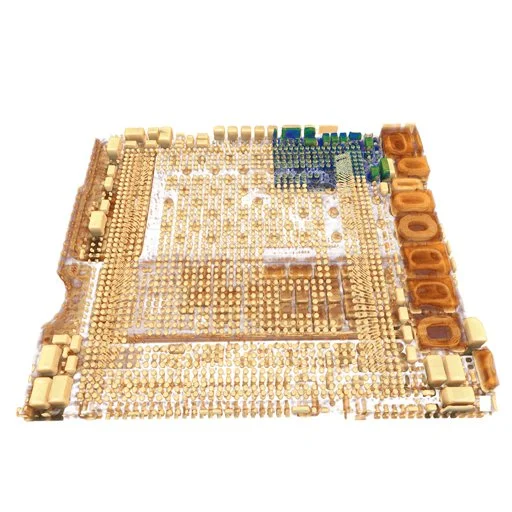
Illustration: A rendered internal structure shown among ZEISS’s Dragonfly imagery; see the source for its original context. [1]
A customizable workflow
Dragonfly includes Python scripting for users who need repeatable or specialized processing. ZEISS describes access to image channels and properties within the interface, with support for libraries including NumPy and SciPy. That makes scripting useful for automating routine steps, although a reproducible workflow still requires the analyst to document settings, inputs, and checks—not merely rerun a script. [1]
The edition supports imports that include ZEISS TXM and CZI, TIFF, RAW, and DICOM, along with mesh formats and image and movie exports. ZEISS also offers a 30-day trial. Its product FAQ says licenses are tied to one workstation and explains how users without an internet-connected workstation can request offline activation. Because features and access can depend on the license and optional modules, prospective users should check the configuration needed for their particular analysis. [1]
Dragonfly’s central contribution is to put visualization, segmentation, and measurement in one workspace. For an engineer examining voids in an additively manufactured part or a researcher tracing connected structures through a specimen, the important outcome is not simply a striking 3D image. It is a defensible link between the original scan, the features identified within it, and the measurements reported from them. [1][2]
- [ZEISS Microscopy, “Dragonfly 3D World ZEISS edition”](https://www.zeiss.com/microscopy/us/products/software/dragonfly-3d-world-zeiss-edition.html). Product description, features, supported formats, and licensing FAQ. [1]
- [Carl Zeiss Microscopy GmbH, Outstanding 3D Visualization With Best-in-Class Graphics](https://pages.zeiss.com/rs/896-XMS-794/images/20240904_3D-World-ZEISS-Edition_upgrade-flyer.pdf?version=0). Product flyer, September 2024. [2]
Sources
[1] Dragonfly 3D World ZEISS edition https://www.zeiss.com/microscopy/us/products/software/dragonfly-3d-world-zeiss-edition.html
[2] Explore your data in the highest definition through the Dragonfly 3D World ZEISS edition software. It is designed https://pages.zeiss.com/rs/896-XMS-794/images/20240904_3D-World-ZEISS-Edition_upgrade-flyer.pdf?version=0
[3] Dragonfly - A Brand of Comet | Microscopy Today | Oxford Academic https://academic.oup.com/mt/article/33/Supplement_1/8/8163853
[4] Microscopes, Software & Imaging Solutions | ZEISS https://www.zeiss.com/microscopy/en/home.html
[5] ZEISS Microscopy Software https://www.zeiss.com/microscopy/us/products/software.html
[6] APA Formatting and Style Guide (7th Edition) - Purdue OWL® https://owl.purdue.edu/owl/research_and_citation/apa_style/apa_formatting_and_style_guide/index.html
[7] Microscopy Insights Hub | ZEISS https://www.zeiss.com/microscopy/en/resources/insights-hub.html
[8] Light Microscopy Software - ZEISS Vision Care https://www.zeiss.com/microscopy/en/products/software/light-microscopy-software.html
[9] ZEISS ZEN desk https://www.zeiss.com/microscopy/en/products/software/zeiss-zen-desk.html
[10] How to Write Articles: Step-by-Step Guide (with Examples) https://www.wikihow.com/Write-Articles
Available on Amazon. For orders larger than 10+ contact us at cmmquarterly@gmail.com